
Built around the owner's real workflow

See the workspace behind every clear next move.

FieldCRM keeps customer context, work, money, schedule, closeout, and the next owner action connected. Shared action logic explains what to do next; it does not invent progress or contact customers for you.

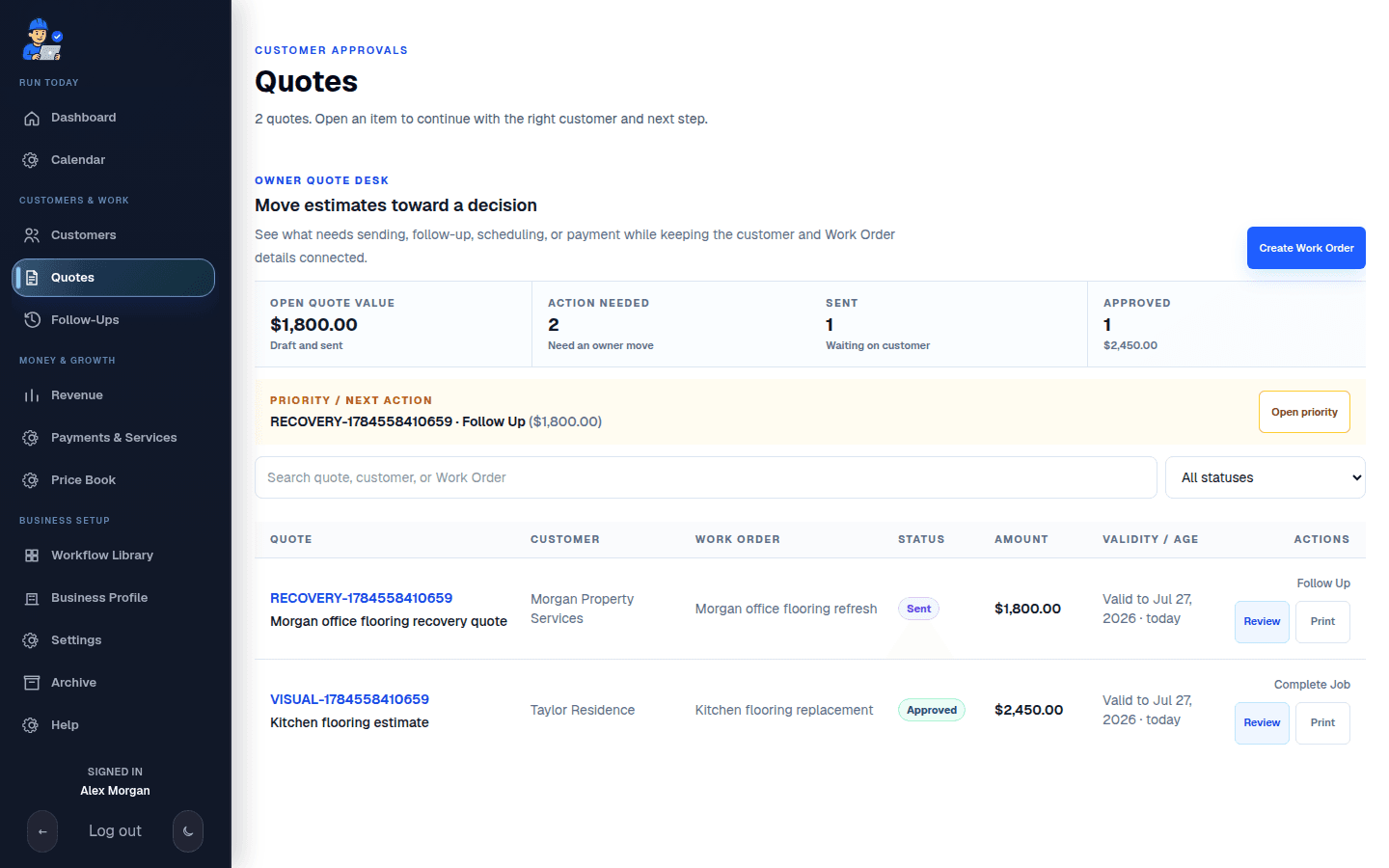
Live FieldCRM Quote desk showing open value, customer decisions, connected Work Orders, and owner actions.
Live sandbox capture from the authenticated quote approvals surface at /app/crm?section=work-orders&module=quotes, 1440x900 light, using disposable QA seed data only.

Business lifecycle

The Owner Dashboard organizes attention, not just records.

Each stage answers an owner question and points back to the underlying customer, Work Order, quote, job, payment, or follow-up.

  1. 01

    New Work

    Which new Work Order needs review?

    Add any missing customer, service address, scope, or timing details.

  2. 02

    Quotes

    Which Work Order needs an estimate? Which approval needs a follow-up?

    Build, send, resend, revise, or follow up on the quote.

  3. 03

    Scheduled Jobs

    What is truly scheduled or active?

    Schedule approved work, review the job details, or complete the required closeout steps.

  4. 04

    Payments

    Which approved job is waiting on money or review?

    Open the quote or payment details without changing the job's schedule or completion status.

  5. 05

    Follow-Ups

    Which customer relationship needs the next owner move?

    Create a follow-up for post-job care, a callback, or future work.

A real field-service path

One customer record. Seven clear checkpoints.

Follow an illustrative service record from first call through paid work and the next owner-created relationship task.

Create customer, Create Work Order, Build estimate, Send approval—then keep each real business event attached to the record.

Illustrative record—not live customer data or automatic progress.

Willow Avenue HVAC repair · Residential serviceExample quote · $2,480
  1. Step 1 of 7: Captured

    New lead

    Source
    Customer call
    Next action
    Create the customer and Work Order.
  2. Step 2 of 7: Owner reviewed

    Qualified prospect

    Fit
    Service area confirmed
    Next action
    Confirm scope, urgency, and timing.
  3. Step 3 of 7: Draft ready

    Estimate built

    Example value
    $2,480 estimate
    Next action
    Review scope and line items.
  4. Step 4 of 7: Awaiting decision

    Quote sent

    Delivery
    Owner-triggered
    Next action
    Follow up on customer approval.
  5. Step 5 of 7: Customer approved

    Job won

    Value
    $2,480 approved
    Next action
    Schedule the approved work.
  6. Step 6 of 7: Explicit milestones

    Service scheduled & completed

    Record truth
    Schedule and closeout stay separate
    Next action
    Finish the completion checklist.
  7. Step 7 of 7: Owner directed

    Paid & follow-up

    Growth
    Payment and relationship history
    Next action
    Create the next follow-up task.

The public quote page supports customer review, approval, signature, and payment when enabled. Payment never schedules or completes a job; scheduling, closeout, communication, and follow-up remain explicit owner actions.

Workflow Library

Keep the workflow tools the business actually uses.

The Workflow Library adds visible modules and checkpoints to work the owner already controls. Module state is explicit, setup is reviewable, and turning one off does not erase existing records.

Ready
The workflow module is enabled and its required choices are saved.
Needs setup
The module is on, but a required choice still needs the owner.
Off
The module rules are inactive; existing saved work is not deleted.

Completion Checklist

Choose what a complete job must include.

The owner can require final job photos, saved completion notes, an open owner-scheduled post-job follow-up, or a combination. FieldCRM checks the selected evidence before completion and stores an immutable closeout evidence snapshot when the job is completed.

  • Final photos
  • Completion notes
  • Owner-scheduled follow-up

No automatic customer contact: follow-ups are owner tasks, and communication remains owner-triggered.

Product areas

The working surfaces behind the workflow.

The Owner dashboard, Customer workspace, Job calendar, Follow-Ups, pricing, and revenue views share the records needed to move the same work forward.

Customer workspace

Know the customer and the work around them.

The customer directory is the relationship index; each customer workspace carries the practical context for current and future service.

  • Customer and company records with searchable contact details
  • Job sites, access context, notes, photos, and files
  • Connected Work Orders, quotes, jobs, follow-ups, value, and activity
  • Archive and restore for supported operational records

Quotes, pricing, and revenue

Keep the decision and the dollars tied to the work.

Pricing starts inside the Work Order and remains connected through the public quote decision, payment context, and owner revenue view.

  • Reusable pricing catalog plus editable estimate line items
  • Branded quote send and resend from the owner workflow
  • Public quote approval, signature, customer note, and Stripe payment
  • Quote status, payment context, revenue visibility, and protected paid history

Scheduling and follow-through

See only work that has actually been scheduled.

Scheduled work is shared across the Owner dashboard and Job calendar, while Follow-Ups holds owner-created relationship and revenue tasks.

  • Scheduled-work parity across Dashboard and Calendar
  • Day, week, and month context for jobs and scheduled work
  • Follow-Ups for callbacks, quote nudges, post-job care, due dates, and assignments
  • Clear next-best action guidance without hidden workflow changes

Workspace and records

Work in the field or at the desk without losing context.

The same operating workspace adapts across devices and themes while preserving the history an owner needs to trust.

  • Responsive phone, tablet, laptop, and desktop layouts
  • Light and dark workspace support
  • Immutable closeout evidence after a job is completed
  • Protected financial history alongside archive and restore controls

Product truth

Records move only when the real business event happens.

Customer payment does not fabricate scheduling or completion. A paid quote can surface the owner's next step, but the owner still schedules the job and explicitly completes the work.

Owner control

Guidance is not customer messaging.

FieldCRM can show a next-best action, store an owner-scheduled follow-up, and prepare the right workspace. It does not automatically email, text, approve, schedule, or close work on the owner's behalf.

Start with the connected CRM foundation.

Add the customer and Work Order, build the estimate, then move each owner decision forward without inventing progress. Try the full core workflow for 14 days with no card required.